Case study / 02 / A connected personal health product
Personal Trainer
A private iPhone-first app that connects food scanning, nutrition, training, recovery, skin, and journaling. I built the product around a simple idea: useful guidance starts with records you can trust and correct.
Fictional web preview open to everyone. Customer accounts for the full app are not open yet; personal records stay private.
22 seconds / Ingredient review
See the reason behind the flag.
Personal preferences and general evidence answer different questions. Watch the review keep them separate, surface missing sources, and show the explanation behind a finding.
Actual web-interface captures with fictional ingredients and references. Generated supporting imagery and narration; original music. Early private build.
Read the video transcript
An ingredient flag should come with an explanation. Personal Trainer keeps your preferences separate from general evidence. If a source is missing, the review says so. Read the finding. Check the reason. This is an early private build. See the walkthrough at the link.
22-second preview · Play with sound or read the on-screen captions.
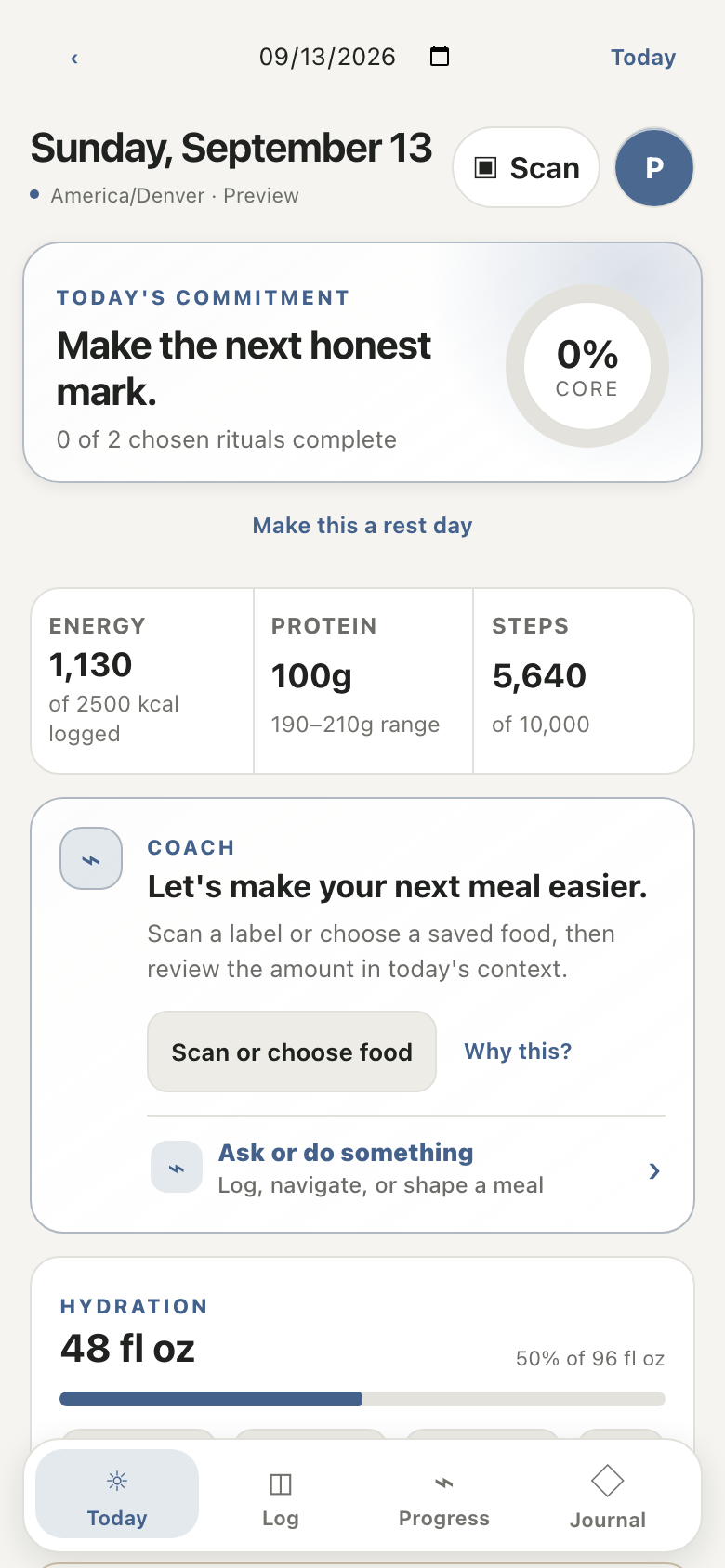
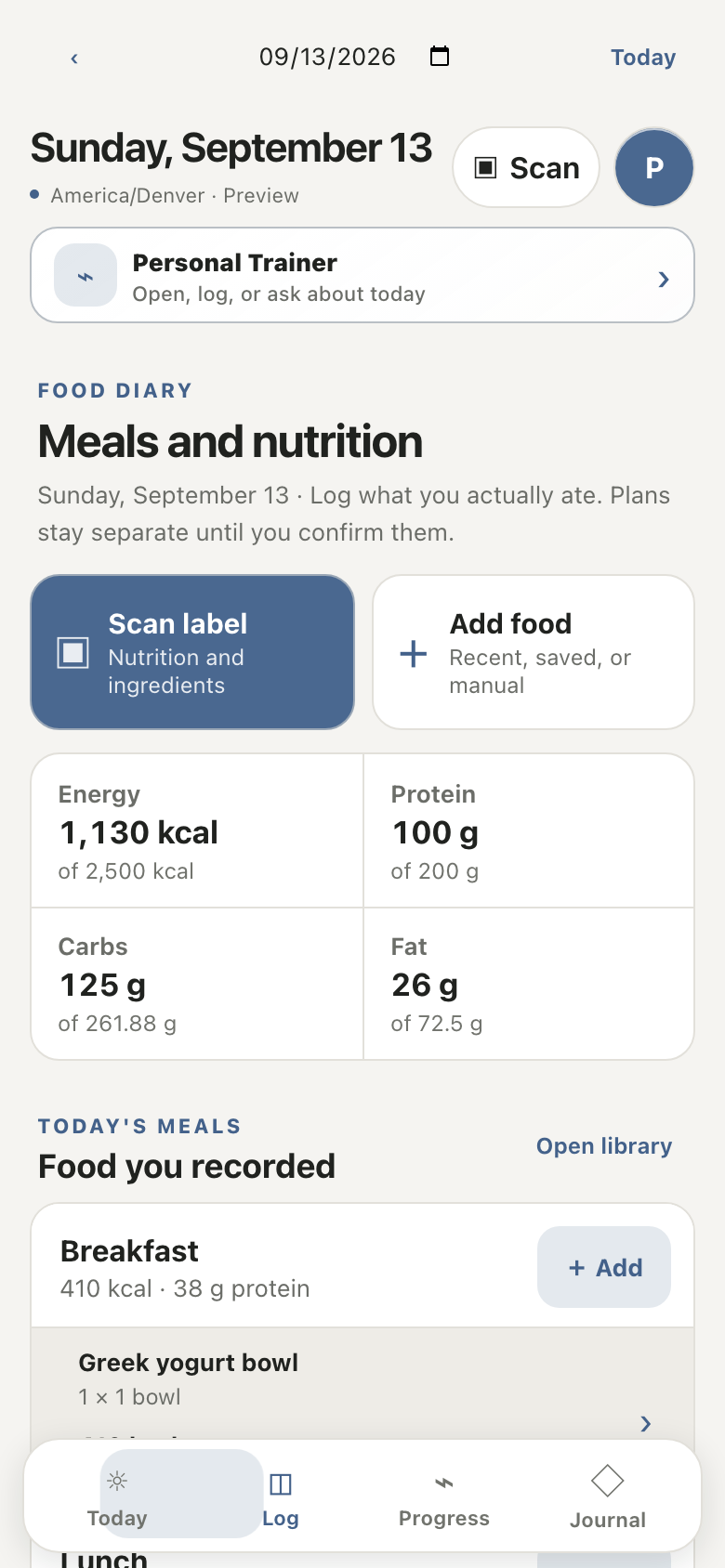
Today / daily contextLog / repeatable entry
Actual responsive web interface
Less app switching. More useful context.
Food, movement, recovery, and reflection share a daily timeline. Four primary destinations keep the product learnable even as its capabilities grow.
The daily-path and journal interaction language grew out of my earlier Treadway project. Personal Trainer extends that work into a native iPhone client and a structured nutrition and evidence system.
Captured from the running web app’s read-only preview, September 2026. Synthetic records only; these are not native-iPhone screenshots or private account data.
Review before you record
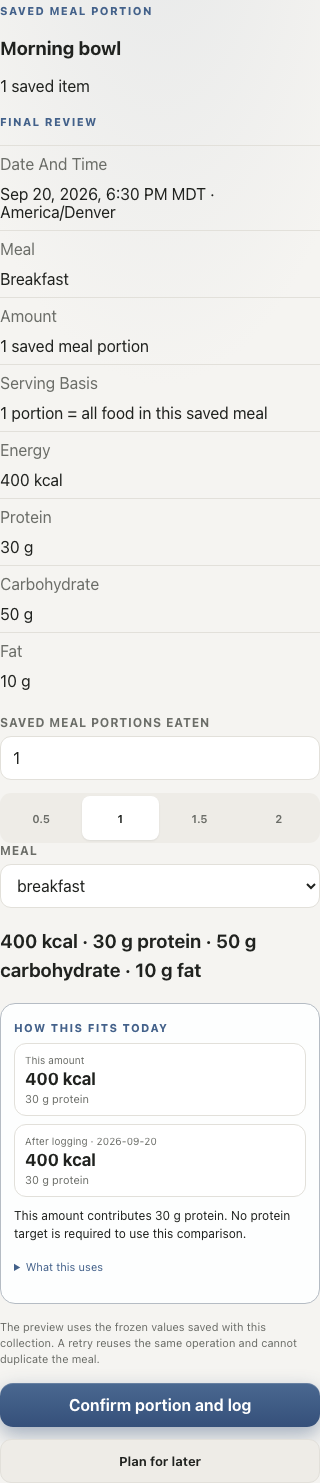
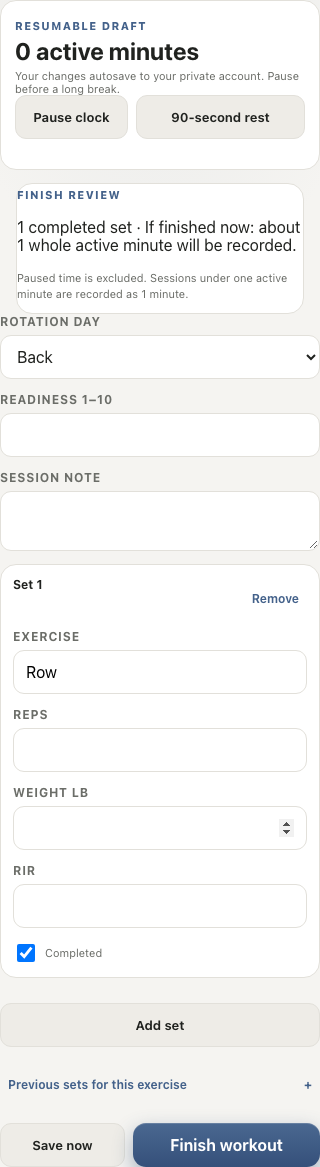
Know what you’re about to record.
A saved meal still needs a date, a meal, and the amount actually eaten. The review puts those choices beside calories, protein, carbs, and fat—even for a fractional portion.
Before finishing a workout, the review shows completed sets and whole active minutes. It explains the one-minute recording minimum and keeps paused breaks out of the duration.
Actual development component captures with fictional records · October 6, 2026. These web improvements are separate from the public interactive preview. Full-app customer accounts and physical-device release checks remain unfinished.
Meal reviewDate, meal, portion, and four totals stay together.Workout reviewCompleted sets, active minutes, and the recording minimum.
Native capture / Actual review screen
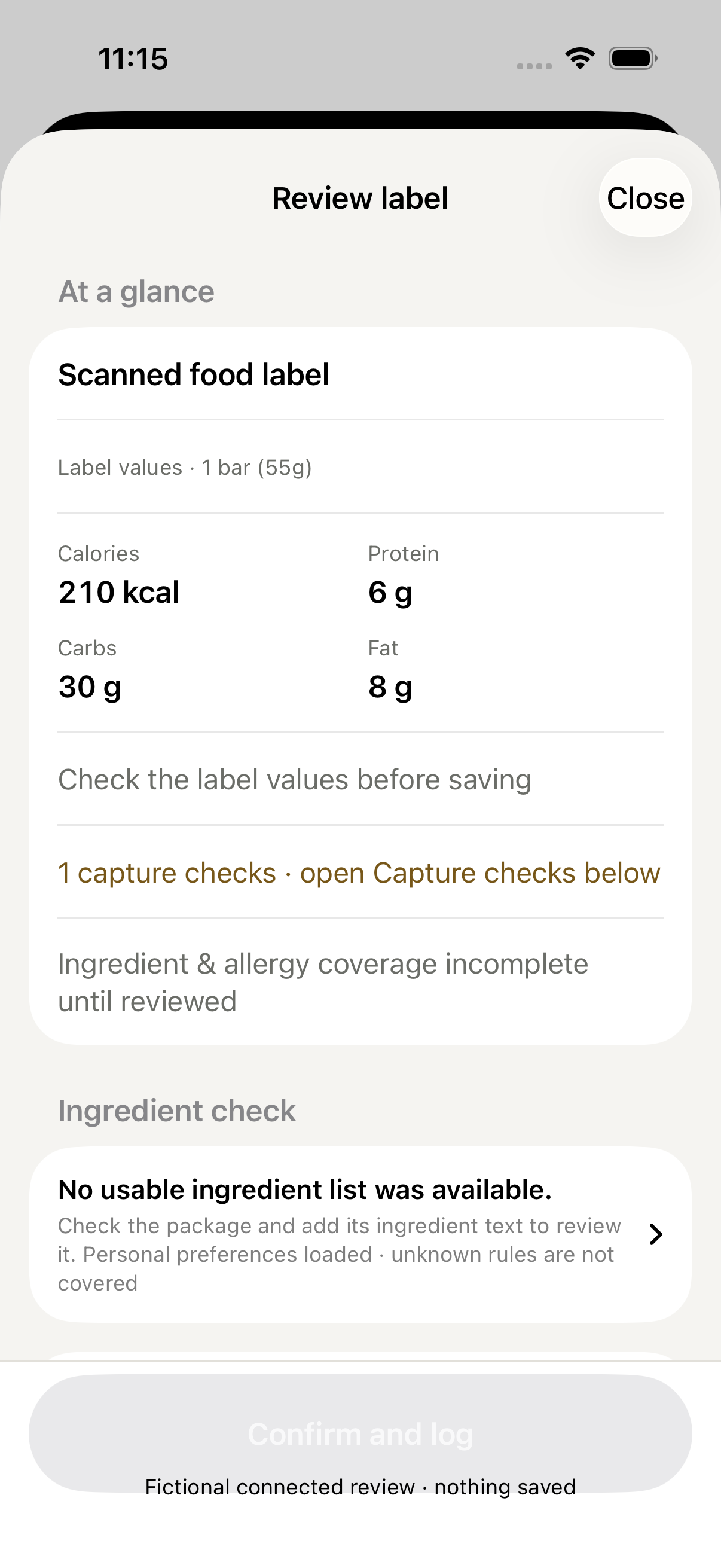
A scanned label still needs your review.
I checked the complete path from a fictional US nutrition label in the system Photos picker through unmodified on-device Apple Vision to this review. The accepted source stayed linked to the extracted values, printed serving basis, and editable fields.
Recognition left verification off and confirmation disabled. Nothing was logged or saved to an account. Closing the review and explicitly discarding the local draft were checked too.
Actual iOS Simulator capture with fictional label data · October 6, 2026. Source and Simulator evidence only. Camera capture, physical-device behavior, live accounts, general OCR accuracy, and customer launch remain unverified.
From photo to reviewThe label is a source to check. Recognition alone does not confirm a food record.
8 seconds / A focused native interface repair
Make the next input readable.
The calorie prompt was clipped at enlarged text. This short comparison shows the problem, then the adjusted Calories prompt and unit.
My own development work, October 7, 2026. Separate fictional iOS Simulator stills, edited for comparison—not a continuous workflow. The after view shows Calories only. No live account, physical-device, saved-record, or customer-result claim.
Read the silent video transcript
Before: The calorie prompt gets clipped. After: Now the prompt and unit fit. See the work: paxtonraithel.com. Fictional Simulator demo · source candidate.
8-second silent comparison · On-screen captions and transcript · Fictional development data.
01 / The product problem
A scan is not yet a fact.
Food scanners, calorie trackers, and journals usually create separate histories. Combining them is useful only if a guessed serving, missing nutrient, or model suggestion cannot quietly become a fact. Personal Trainer makes capture, correction, intake, and interpretation separate steps inside one everyday experience.
02 / My contribution
Own the decisions, then test the consequences.
I defined the connected product, directed implementation and independent AI-assisted audits, shaped the data and evidence contracts, and tested the app on my phone. Real failures—small print, curved labels, incomplete barcodes, and interrupted saves—feed back into regression tests and release decisions.
The everyday workflow
From the package to a record you can stand behind.
Nutrition and ingredients have separate capture paths. A long ingredient list can be photographed closer without making the nutrition panel fit the same frame. Public barcode matches are references to review—not permission to guess missing macros.
01CaptureBarcode or label · separate close-up ingredients
02ReviewNutrients · units · serving basis · unresolved text
03RememberSave a corrected food or a reusable meal
04LogConfirm what was actually eaten and how much
05ReflectConnect the week’s records without inventing causes
03 / Engineering decisions
The difficult work happens between features.
A corrected label, a delayed response, an offline save, and an account switch all change what the app is allowed to trust. I designed those boundaries as part of the product, not as cleanup after the demo.
01
Capture once. Review before it counts.
Native Apple Vision reads nutrition labels on-device. Barcode references and separate close-up ingredient captures feed a correction screen; saving a product is distinct from logging the amount eaten. Missing macros stay unknown, not zero.
02
Ingredient evidence, without a fear score
A deterministic evidence system separates allergy and preference matches from scientific attention flags. It distinguishes hazard from realistic exposure, restrictions from bans, and incomplete evidence from reassurance. Colors and preservatives are not automatically penalized.
03
One connected daily record
Today, Log, Progress, and Journal connect saved meals, macros, workouts, hydration, sleep, skin observations, body measurements, and dietary needs. Paper-journal capture is reviewed before it joins the written record. Ordinary tracking works without a model.
04
Local intelligence with a narrow job
Fast commands use explicit app actions; optional Ollama assistance receives bounded, consented context. A private MCP server supports interactive assistant access. Models do not invent nutrient values, ingredient ratings, or medical conclusions.
05
Privacy across the whole lifecycle
Supabase Row Level Security, private image storage, owner-bound queues and replies, idempotent saves, audit history, export, and deletion are treated as connected controls. Administrative usage summaries exclude private photos and journal prose.
06
Quality gates that can say no
Parser fixtures, native tests, API checks, and synthetic multi-owner exercises cover different failure classes. Device observations remain separate from source checks. Generated deep-journal interpretation stays disabled because tested local models did not meet its evaluation bar.
Ingredient analysis
Useful caution. Not a toxicity scoreboard.
The same ingredient can mean different things depending on route, exposure, jurisdiction, and the person. A warning requirement is not a ban; an association is not proof of causation.
What the label says
Preserve the original ingredient wording, nested ingredients, and unresolved OCR for correction.
What evidence supports
Use source-backed attention levels and explicit uncertainty. Keep regulatory status and effective dates attached to the claim.
What matters to this person
Show declared allergies, dietary needs, sensitivities, and preferences separately from general evidence.
What the app cannot know
Do not infer a dose, diagnose a reaction, guarantee safety, or promise that a food swap will clear someone’s skin.
On-device OCRNo paid OCR or metered model dependency
4 destinationsOne connected tracking experience
Owner-scopedRecords, media, queues, and review
04 / Evidence and honest limits
A private build. Customer release checks remain.
The implementation includes native capture, structured tracking, privacy controls, local assistance, and deployment tooling. Source and fictional-data checks support the engineering work. A current customer account walkthrough, broader physical-device testing, and a customer pilot remain necessary before opening the full app.
What I am not claiming
No universal OCR accuracy, clinical validation, end-to-end encryption, completed App Store launch, paid-user traction, or proven market value. Long-label capture, broader device coverage, accessibility, and sustained daily-use evaluation still need real-world evidence.
Deep automatic journal interpretation is deliberately unavailable after failed model qualification. A refusal to overpromise is a product decision too.